
I’ve recently been having a look at the best way to present Excel Add Ins using our locally installed instance of Microsoft Excel and our virtualised Add Ins.
The easiest approach is probably to create an additional shortcut in your package called ‘Microsoft Excel 2010 with XXX Add In’ which points to your local instance of Excel.exe. Running this shortcut will launch the local instance of Excel.exe inside the virtual bubble, and you should then see your virtualised Add Ins when the application is loaded.
The trouble with this approach is that users will generally head straight to the main shortcut to Microsoft Excel (the shortcut to the local instance) and wonder why they can’t see their Add In. On top of this, using the approach above could mean that we have multiple ‘Microsoft Excel 2010 with XXX Add In’ shortcuts, which can look quite untidy.
An alternative approach is presented by the RunVirtual registry key introduced in App-V 5 . What this feature enables us to do is to launch the shortcut to the locally installed version of Excel and drag this process (Excel.exe) instance inside the virtual bubble of a specified package.
Again, I won’t go into too much detail here since there’s a great blog about how RunVirtual works here and also a mention of an important update for App-V 5 SP3 here, which enables us to target packages published to the User.
Anyway, I’m babbling a bit so we’ll crack on….
In my opinion RunVirtual is ALMOST great. Ideally we would be able to create a RunVirtual reference to a local application like so (Microsoft Excel in this example):
HKEY_CURRENT_USER\Software\Microsoft\AppV\Client\RunVirtual\Excel.exe
and then list multiple virtualised Addins underneath that (by specifying their PackageId and VersionId). Unfortunately we can only specify one virtual package under this key.
What this limitation means is that we will need to specify one ’empty’ virtual package which maintains a static PackageID and VersionId. This package will NEVER change. We will then use a Connection Group to connect this single package to our multiple virtualised Add In packages. What this essentially means is that when we launch the local version of Excel.exe, it will launch our associated RunVirtual package (our ’empty’ package) which in turn will launch all of its connected packages.
In honesty though, and before we continue, you would really require App-V 5 SP3 as a minimum. Why? Because the schema for connection groups has changed and it now enables us to specify OPTIONAL packages (i.e, if a connected package is not published just ignore it and don’t throw an error!) and to automatically use the latest published version of a package. For me, the ‘optional’ addition is the most important. After all, our Add Ins aren’t necessarily for all users! We may have one Add In policied to a specific group of users, and another Add In policied to another specific group of users. And membership of these policied AD Groups may very well be mutually exclusive! The optional attribute saves us a great headache in that sense and provides us with a flexibility that helps to reduce the management overhead.
Am I still babbling? Ok. An example….
Step 1. Create an ‘Empty’ Package
We will link to this from the RunVirtual key. This package isn’t entirely empty – make sure you add a dummy file to the package otherwise it will throw an error when you’re adding the package (presumably because there is no VFS to mount).
Also, ensure you allow Named Objects and COM objects to interact with the local system. They’re not both required for this example (although I think Named Objects IS required), but we need to think ahead. If we are packaging a COM Add In for Excel, this may well be required.
Finally follow this guide. This guide lets us dynamically add the relevant RunVirtual key from our AppxManifest.xml. In this example we are going to add RunVirtual in the HKCU key, since we are publishing the package to the User and NOT the machine.
Note to SCCM 2012 Virtual Environment users (and this part is all untested by myself):
As mentioned in the comments section below, when using SCCM 2012 Virtual Environments it is not a requirement that you specify a dummy package. Instead you can specify the AppConnectionGroupId and VersionId of the connection group. The problem with this approach is that the connection group gets dynamically generated on each client, which means that the AppConnectionGroupId and VersionId of the connection group is different for each client. I have suggested that to set the RunVirtual registry value dynamically you can use the approach documented here, so long as the dynamically generated connection group has a static name (I can’t verify this because I don’t have the environment to test with)!!
Get-AppvClientConnectionGroup -all | where {$_.Name -eq 'Name_Of_Connection_Group'} | foreach { New-Item -Path HKCU:\SOFTWARE\Microsoft\AppV\Client\RunVirtual -Name Excel.exe -Value ($_.AppConnectionGroupId.toString() + '_' + $_.VersionId.toString()) -Force }The alternative approach is to use a dummy package like I have suggested in this blog, whereby the PackageId and VersionId of the dummy package remains static.
Another Note:
As Tim Mangan has mentioned in the comments section below, delivery via an App-V server differs from SCCM 2012 Virtual Environments in that it requires at least one non-optional package.
Step 2. Sequence Two Add In Packages
Each package will contain a different Excel Add In. For this proof of concept I Googled for free XLA files and created a package for each one. I simply lumped the XLA file into the following location, and that was that:
%AppData%\Microsoft\Excel\XLSTART
(You can alternatively copy it here for a per-machine install)
C:\Program Files\Microsoft Office\Office14\XLSTART
Again, ensure you allow Named Objects and COM objects to interact with the local system. We need to ensure that all of our connected packages contain the same setting for COM and Named Objects, otherwise we may get errors when launching the connection group such as:
The Application Failed to Launch. This may be due to a network failure
or
The connection group {xxx} version {xxx} could not be published because the virtual COM settings of the individual packages conflict.
Verify that the virtual COM settings are the same for all member packages and try again.
Step 3 – Create Connection Group for Local Testing
Create a connection group using this tool. You should add the ’empty’ package as being mandatory (i.e, NOT optional). The version shouldn’t matter since this package will NEVER change.
The other two Add In packages should be marked as Optional and Ignore Version.
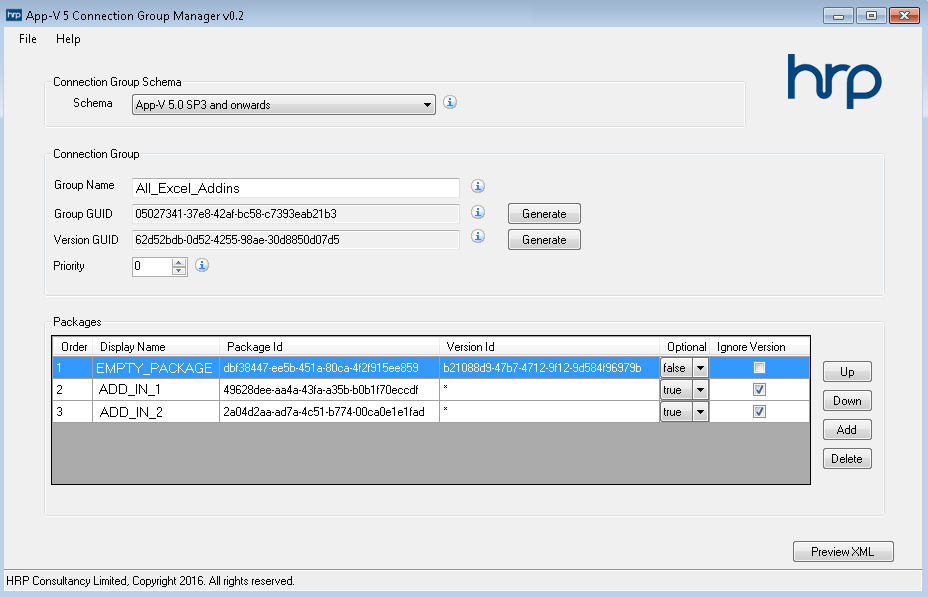 (Note that in your live environment you will probably just use your App-V publishing server to manage this connection group and its settings)
Step 4 – Local Testing
Ensure scripting is enabled on your machine
Set-AppvClientConfiguration -EnablePackageScripts 1Add and Publish all your packages (since our RunVirtual key should be installing to HKCU, we publish our packages to the User and NOT the machine)
Add-AppvClientPackage -Path "Empty_Package.appv" | Publish-AppvClientPackage
Add-AppvClientPackage -Path "Addin1.appv" | Publish-AppvClientPackage
Add-AppvClientPackage -Path "Addin2.appv" | Publish-AppvClientPackage
Add and Enable our Connection Group
Add-AppvClientConnectionGroup -path "AddInCG.xml" | Enable-AppvClientConnectionGroupLaunch the local Excel version, and see your Add Ins appear!
As a further test, try un-publishing just one of the Add In packages and then launch Excel again. You will notice 2 things:
1) You don’t get an error, even though the package is not published! This is due to the Optional attribute in our connection group. So that works well.
2) You will notice that the Add In still appears in the Excel Add In tab! Doh. Why has this happened?
Well. Putting App-V aside for a second. You will notice that when you lump your XLA file into %AppData%\Microsoft\Excel\XLSTART and then launch Excel, the date modified of the XLA file changes! Close Excel and the Date Modified reverts back to its original Date Modified date. So what I believe is happening here is that App-V detects a modification to the file, and writes it to a Copy on Write location.
Importantly, it doesn’t write it to the Copy on Write location of the Add In package but instead to the Copy and Write location of the Connection Group!!
If you copied your XLA file to the per-user location (as in this example), you will find a saved XLA file in this location:
(Copy on Write (COW) Roaming) %AppData%\Microsoft\AppV\Client\VFS\{ConnectionGroupPackageId}\AppData\Microsoft\Excel\XLSTART
If you copied your XLA file to the per-machine location, you will find a saved XLA file in this location:
(Copy on Write (COW) Local) %LocalAppData%\Microsoft\AppV\Client\VFS\{ConnectionGroupPackageId}\ProgramFilesX86\Microsoft Office\Office14\XLSTART
So in essence, when you un-publish your Add In packages you will need to add some logic to delete this file.


Good post, But in your situation where you are creating a Connection group you don’t need the dummy app as you can use the connection group packageid and versionid in the RunVirtual Key.
I came across this article when trying to find out how you determine what SCCM 2012 with use as a package and version ID when creating a connection group from an virtual environment. It appears that this is random so the dummy package will definitely help in this situation.
Hi Rich. Thanks for your comment! And it’s an interesting point. When you say “you can use the connection group packageid and versionid” do you mean the connection group AppConnectionGroupId and VersionId? Or do you mean the PackageId and VersionId of an arbitrary connected package within the connection group?
Yeah, i guess the intention of the dummy package is to maintain a static PackageId and VersionId, so we can manage the connected packages and the connection group separately.
Yes I meant the AppConnectionGroupId and VersionId of the connection group.
I’m using Virtual Environments through SCCM and thought that when the connection group gets created on deployment those id’s would be static. But they don’t appear to be from my testing.
My scenario is a couple of IE add-ons which I’ve created applications for I then add them both to a virtual environment in CM 2012.
when either is published the connection group also gets generated on the client by sccm running powershell.
I was thinking then I could obtain the groupid and versionid and manage that in a RunVirtual key. But it appears not.
I think I understand where you’re coming from, although I don’t currently use SCCM here so am unable to fully test your scenario. How are you setting the RunVirtual registry key? Does the connection group Name remain static or does that get given a dynamic name when published? If the name remains static you could potentially use the powershell approach documented here but tweak it slightly replacing ‘Get-AppvClientPackage‘ with ‘Get-AppvClientConnectionGroup’ and ‘$_.PackageId.toString()‘ with ‘$_.AppConnectionGroupId.toString()‘. Disclaimer: Untested!! 🙂
Note that the suggestion that the dummy package is not needed only applies to deployments using SCCM virtual environments. Delivery via App-V server requires at least one non-ootional package.
Tim
Thanks Tim, and thanks Rich. I’ve added some comments at the end of Step 1 for reference. Hopefully I’ve understood correctly! And thanks Tim for all your work in the App-V field! It’s helped me immeasurably in the past and I’m sure it will in the future!
Hi Kae
I have been testing the Dummy package and connection group method.
Do I have to ref the PackageId and VersionId of the Dummy Package in my 2 x Outlook addin packages for the RunVirtual keys as below:
<appv:Package DisplayName=”RunVirtualDummyPackage” PackageId=”58cc1eb5-cc96-49ca-9527-3a2edefc3eee” VersionId=”c5452e9e-b63e-4774-aa68-e7e11862b8f7″ IsOptional=”false” />
<appv:Package DisplayName=”Symantec_Enterprise_Vault_11.0.7802_V01″ PackageId=”e7804b49-f033-4999-8724-acbe7bbfc62b” VersionId=”*” IsOptional=”true” />
<appv:Package DisplayName=”NewsGator_SocialSites_5.0.0_V01″ PackageId=”feda7c7c-0ffe-4cbc-9d78-92720275b50c” VersionId=”*” IsOptional=”true” />
Hi Gary. That looks about right for your connection group XML. You don’t have to reference anything from your packages – connection groups are managed separately from your packages (it’s not like the old .OSD/DSC days!). You either manage them directly on your publishing server, or for local testing, generate a connection group XML like the above article explains. Thanks.
..so what PackageID_VersionId gets copied to the Registry..? Only one entry will get populated in the registry. Does that not need to be the Dummy Package values..?
Gary
Correct – the RunVirtual registry points to the ‘dummy’ package PackageId/VersionId, and you connect that ‘dummy’ package to all your addins using the connection group.
Hi Kae..another question..!
In testing I have published several apps to the user and utilised the dummy package method/appxmanifest.xml
If I publish oracle smartview after the dummy package that then shows in the excel ribbon. I then publish acrobat pro and the pdf plugins do not show..
If I start from scratch and reverse the order then the pdf addins show but smartview does not. Get-Appvclientpackage shows the apps as “in use”
Connect group.xml below..
<?xml version=”1.0″ encoding=”UTF-16″?>
<appv:AppConnectionGroup xmlns=”http://schemas.microsoft.com/appv/2014/virtualapplicationconnectiongroup” xmlns:appv=”http://schemas.microsoft.com/appv/2014/virtualapplicationconnectiongroup” AppConnectionGroupId=”4c41e1f7-43c3-46b7-a2fd-1e59e4abf3e8″ VersionId=”091392ea-b906-42c6-a1c7-2922b6476893″ Priority=”0″ DisplayName=”Office_Suite_Addins_Connection_Group”>
<appv:Packages>
<appv:Package DisplayName=”DummyPackageOfficeSuite” PackageId=”92636c8e-cc51-469f-856d-b389b209a3b0″ VersionId=”6ff31596-ee18-47bc-b62f-213d71cbb2a7″ IsOptional=”false” />
<appv:Package DisplayName=”Adobe_Acrobat_Pro_X_10.1.16_V01″ PackageId=”b8c914a5-7183-4b08-99a9-0b9b8e92da3f” VersionId=”*” IsOptional=”true” />
<appv:Package DisplayName=”Adobe_Acrobat_Standard_11.0.11_V01″ PackageId=”f201fa4d-936f-470f-a063-0878a4adeaa9″ VersionId=”*” IsOptional=”true” />
<appv:Package DisplayName=”Oracle_SmartView_11.1.2.5.600_V01″ PackageId=”f2f71d48-49fd-4a63-90d6-de5d154f582a” VersionId=”*” IsOptional=”true” />
<appv:Package DisplayName=”PoliteMailSoftware_PoliteMail_4.60.12.0351_V01″ PackageId=”2c1743b5-b451-4fa6-a67f-890dfb2dadfa” VersionId=”*” IsOptional=”true” />
</appv:Packages>
</appv:AppConnectionGroup>
Hi Gary. It’s difficult to say without debugging, but I suspect it’s due to isolation levels of registry keys and/or folders. You may have to set them to merged as opposed to isolated/override. Tim refers to a similar thing here: http://www.tmurgent.com/TmBlog/?p=2240. Please post back if this is the case as I can add it to my blog.
Update…one thing we found when using the Dummy Package method was that none of the Connection groups were created on the client if the “Ignore Version” option was ticked. Once we removed that tick all the groups appeared on the client..
Thanks for the update, Gary….I’ll look into it if I get a second.
Hi Kae
Another thing we are noticing when using the App-V Console to publish the “dummy package” and the “Office addins” apps via the office connection group, we get an Office 2016 activation window. We publish to the user. Office is local to the VDI. Weirdly if we remove ourselves from this connection group we no longer get the activation window. We are going to try and use Tim’s script to then publish the Dummy app to the machine and see the results.
Keep you posted…
Gary
Thanks Gary. It’s been a while since I visited this so your feedback is really helpful….
Hi Kae,
We have the above solution in place and so far it has worked. However we now have an issue our Office Dummy Suite package has only Allow virtual applications full write permissions to the virtual system but the application Morningstar needs Allow all COM objects to interact with the local system checked and this obliviously fails in that the connection group is not aligned, although the application works but in event viewer there are errors.
Do you know anyway around this?
Thanking you in advance for your help.
Prakash
Hi. You probably need to have the same configuration in all package in the connection group. You have to allow all COM objects in the dummy package aswell.